To set up Amazon Ads for a KDP book, open your KDP Bookshelf, choose Promote and Advertise, and create a Sponsored Products campaign. Start with an automatic campaign on a small daily budget, then build manual keyword campaigns from the searches that actually sell your book.
That is the short version. The rest of this guide walks through each setting, how to decide what you can afford to spend, and how to turn a first campaign into ads that pay for themselves. At the end, you will see real numbers from a 2026 campaign I manage.
What You Need Before Your First Campaign
Ads send shoppers to your book's product page. If that page does not convert, ads only make the problem more expensive. Check these first:
- A live book. Your ebook or paperback must be published and available on the Amazon marketplace you want to advertise in.
- A strong cover. In search results, the cover is most of your ad. It needs to read clearly at thumbnail size and match your genre.
- A clear book description. The first lines should tell readers exactly what they get and who the book is for.
- A competitive price. Compare your price with the top books in your category before you pay for clicks.
- Some reviews, ideally. Ads can work without reviews, but a few honest ones help shoppers trust a new book.
You do not need KDP Select to run ads. Any eligible book can be advertised, whether it is exclusive to Amazon or published wide.
Work Out Your Break-Even ACOS
ACOS (advertising cost of sales) is your ad spend divided by your ad sales. Before you spend anything, work out the ACOS at which an ad sale stops making you money. That is your break-even ACOS, and it equals your royalty divided by your list price.
| Book and price | Royalty per sale (approx., 1 MB file) | Break-even ACOS |
|---|---|---|
| Ebook at $0.99 (35% plan) | About $0.35 | About 35% |
| Ebook at $2.99 (70% plan) | About $1.94 | About 65% |
| Ebook at $4.99 (70% plan) | About $3.34 | About 67% |
| Ebook at $12.99 (70% plan) | About $8.94 | About 69% |
| Paperback at $14.99 (60% plan, $4.00 print cost) | About $4.99 | About 33% |
The 70% ebook royalty applies to Amazon.com list prices from $2.99 to $12.99 (raised from $9.99 in July 2026), minus a delivery cost of $0.15 per megabyte. Paperbacks earn 60% of the list price minus printing at $9.99 and above (50% below), and printing cost depends on your page count, so use your own figure from KDP's royalty calculator.
Keep a target ACOS comfortably below break-even. If you are on Kindle Unlimited, page reads add royalties that do not show up in ad sales, so a slightly higher ACOS can still be profitable.
How to Set Up Amazon Ads in Six Steps
Step 1: Open Amazon Ads From Your KDP Bookshelf
In your KDP Bookshelf, open the menu next to your book and choose Promote and Advertise. Under Run an Ad Campaign, pick your marketplace and select Create an ad campaign. This takes you to the Amazon Ads console, where your book is already linked.
Step 2: Choose Sponsored Products
Amazon offers more than one ad type, but nearly every author should start with Sponsored Products.
| Ad type | Where it shows | Best for |
|---|---|---|
| Sponsored Products | Search results and book product pages | Every author, starting with a single book |
| Sponsored Brands | Banner-style placements with a headline and several books | Authors with a series or a catalog of related books |
Step 3: Start With an Automatic Campaign
With automatic targeting, Amazon decides when to show your ad based on your book's details. It is the fastest way to discover the searches and books your readers already use. Use these settings for a first campaign:
- Daily budget: a small amount you are comfortable spending every day, such as $5 to $10.
- Bidding strategy: Dynamic bids, down only. Amazon lowers your bid when a click is less likely to convert, which protects a new budget.
- Default bid: start near the low end of Amazon's suggested range and raise it only if you get almost no impressions.
Automatic campaigns use four match groups: close match, loose match, substitutes and complements. Leave them all on at first; you can lower bids on weak groups later.
Step 4: Write Your Custom Ad Text
Book ads can carry a short line of custom text under your cover. Use it to name the reader and the benefit, not to repeat the title.
- Weak: "A new book by an exciting author. Buy now!"
- Stronger: "Stop procrastinating in 30 days with simple daily habits that stick."
Write two or three versions and run them in separate campaigns. Keep the one with the best click-through rate and sales, then test against it again. Amazon reviews ad text before it goes live, so avoid claims you cannot support.
Step 5: Add Manual Keyword and Product Targeting
After one to two weeks, open the search term report for your automatic campaign. Search terms that produced sales become keywords in a new manual campaign. Our guide to KDP keyword research explains how to find more terms readers use.
| Match type | When your ad can show | Use it for |
|---|---|---|
| Broad | Searches related to your keyword, in any order | Discovering new search terms |
| Phrase | Searches that contain your phrase | Balancing reach and relevance |
| Exact | Searches that match your keyword closely | Proven terms you want to scale |
Product targeting is the other half of manual campaigns. You can target specific books (by ASIN) or whole categories, so your ad appears on the pages of similar titles your readers already buy.
Step 6: Set Budgets and Bids You Can Afford
Start each new campaign with a budget you would not mind losing while you learn. Move money only toward campaigns whose ACOS sits below your target. If a campaign keeps running out of budget early in the day while staying profitable, that is the signal to raise its budget.
How to Read Your Results
The Amazon Ads console shows many columns. These are the ones that tell you whether your ads are working:
| Metric | What it tells you |
|---|---|
| Clicks and click-through rate | Whether your cover, title and ad text attract the right shoppers |
| Cost per click | How much each visit to your product page costs |
| Orders | How many sales Amazon credits to your ads |
| Sales | The list-price value of those orders (not your royalty) |
| ACOS | Spend divided by sales; compare it with your break-even ACOS |
| ROAS | Sales divided by spend; a ROAS of 10 means $10 in sales for every $1 spent |
| Estimated KENP royalties | Kindle Unlimited page reads from your ads, for books in KDP Select |
Impressions matter only as an early check that your ads are showing. Judge campaigns on orders, ACOS and ROAS.
How to Optimize Week by Week
Profitable campaigns come from small, regular changes. Once a week:
- Harvest winners. Move search terms with sales from automatic and broad campaigns into exact-match campaigns.
- Add negatives. Add search terms that spend money without sales as negative keywords, so you stop paying for them.
- Adjust bids. Lower bids on keywords above your target ACOS; raise them slightly on keywords well below it.
- Test ad text. Keep one test running so your best ad copy keeps improving.
- Scale what works. Raise budgets only on campaigns that stay under your target ACOS.
Case Study: 9.63x ROAS at 10.39% ACOS
This is a 2026 Amazon Ads campaign I manage for KDP books, using the same steps in this guide. The figures come straight from the Amazon Ads console for January 1 to October 13, 2026.
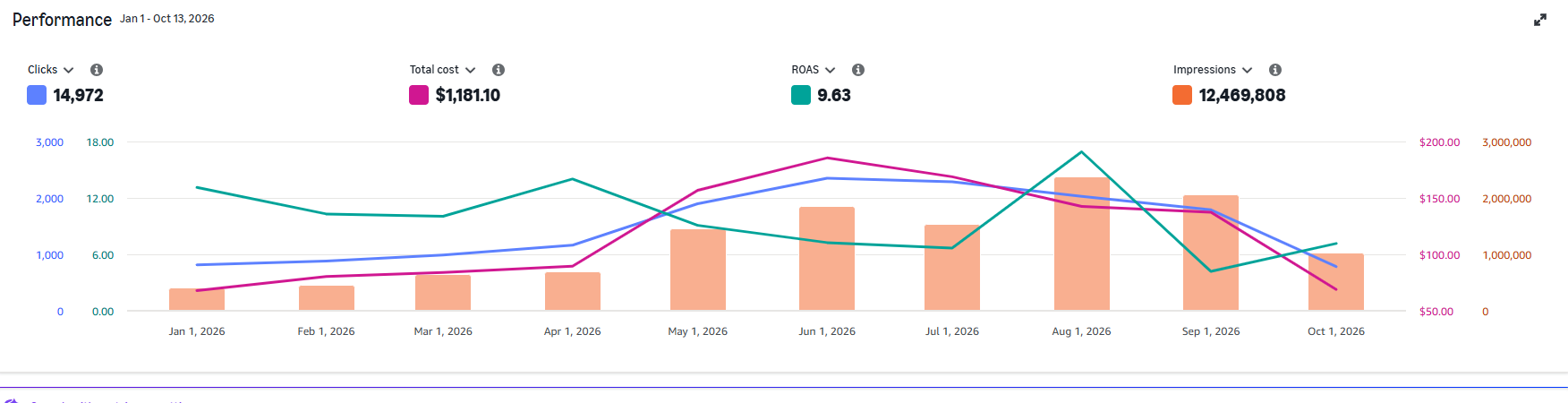
Amazon Ads console, January 1 to October 13, 2026.
What made the difference: keyword research focused on high-intent searches, ad copy tested before any budget was scaled, weekly bid and budget changes, and growth only where ACOS stayed near 10%. With a 10.39% ACOS against a break-even well above that, every order left room for profit.
Results depend on the book, category, price and budget, so treat these numbers as an example of what careful setup and steady optimization can achieve, not a promise.
I set up and run Amazon Ads for KDP authors: research, ad copy, campaign structure and weekly optimization.
Common Mistakes to Avoid
- Advertising before the product page is ready. A weak cover or description wastes every click you pay for.
- Judging too early. A few days of data is not enough. Wait until a campaign has a meaningful number of clicks.
- Ignoring break-even ACOS. Without it, you cannot tell a profitable campaign from an expensive one.
- Bidding high on broad keywords. Broad terms bring volume, but they also bring searches that never convert.
- Never adding negatives. Unprofitable search terms keep spending until you exclude them.
- Scaling everything at once. Raise budgets only on campaigns that have already proven profitable.
Frequently Asked Questions
Start with a small daily budget, such as $5 to $10 per campaign, while you learn which searches convert. Increase spending only on campaigns whose ACOS stays below your target.
No. Any eligible KDP book can be advertised. KDP Select adds Kindle Unlimited page reads, which the Amazon Ads console reports as estimated KENP royalties.
A good ACOS is one comfortably below your break-even ACOS, which is your royalty divided by your list price. For a $4.99 ebook on the 70% plan, break-even is about 67%, so many authors aim far lower.
Start with an automatic campaign to find the searches that sell your book. After one to two weeks, move the best search terms into manual keyword campaigns where you control the bids.
Expect to spend the first few weeks collecting data. Most campaigns need several weeks of regular optimization before ACOS settles at a profitable level.
Yes. You can advertise ebooks and paperbacks. Paperback royalties are usually lower after printing costs, so their break-even ACOS is lower too.
Usually the cover, price or description does not convince shoppers, or the ad is showing for searches that are not a good fit. Check your search terms, add negatives, and improve your product page.